Thursday, July 26, 2007

Ubuntu Live Thoughts

Its been two days since I returned from Ubuntu Live 07 and wanted to give my thoughts on the conference.

Overall, a great collection of people and minds - I enjoyed it very much and came away pleased with the experience.
  • Sessions were too short, too high level, that I came away with less than I could have seen after 30 seconds reading online
  • Disappointed that there were not more non-linux people there - more companies and individuals wanting to move to Linux (or Ubuntu specifically)
  • O'Reilly hosted it and did a wonderful job
  • Next year I'm staying for OSCon as well
  • Tutorials were great and I could have done more (time permitting)
  • Pleased that Canonical's initiatives are focusing on businesses
  • Landscape looks great, especially for an initial release
  • Speakers, to a single one, were excellent
  • Missed the Linux Action Show guys, so disappointed (I was looking but I didn't get the podcast until I returned)
  • Food was very good - lunch boxes were actually too large
  • Stayed downtown Portland and the Maxx is free and easy transportation
  • Audience was generally good, Tutorial audience the best for participation and general help and friendliness
Geez, I can probably go on forever but again its all good baby... see you at the 2nd annual...!

FSF - Got the tee-shirt!

Okay - I've had to get defencive when someone called me on wearing a FSF tee that I purchased at Ubuntu Live.

I purchased two tee-shirts and the book "Free Software Free Society: Selected Essays of Richard Stallman" - but stopped short from purchasing membership into the FSF.

The Free Software Foundation aren't the bad guys - philosophical differences aside. (read my rant on GNU GPL v3)

Where would we be today without the GPL licenses? I doubt Linux would have gotten to the level of use it now enjoys without the 'FREE' license. And I remember back in the day, the first thing you did on any un*x installation was to install the GNU tools (ls, emacs, grep, find, cut...) - they were functional and just worked.

Tuesday, July 24, 2007

Ubuntu Live Keynotes

I've seen all the keynotes for the conference and each was great in its own way. From Mark Shuttleworth's introduction, to Matt Asay's warning to Ubuntu, Eben Moglen's eloquent description to our state of affairs to Tim O'Reilly's excellent out-of-the-box thoughts.

It was great to listen to these gentlemen, as well as all the others, I really owe each of these guys a beer!

Monday, July 23, 2007

Hello from Ubuntu Live 07!

I'm here at my first Linux (specific) conference and greatly enjoying it! Hitting all the keynotes as well as many sessions as possible. I'm meeting some great people, shaking a lot of hands and doing a lot of thinking about Open Source and Linux.

Tuesday, July 03, 2007

GNU GPL v3

What can I say? Have you heard that the Free Software Foundation has released the newest incarnation of the GNU GPL version 3? If you don't know what this is, skip this entry. And if you do know, what do you think?

Me, I think its a mistake. I really do.

Version 2 of the license is about the software, encouraging success through sharing. Take from the source but give back your changes for the common good of all. Crazy talk perhaps in the late 80's and a hard sell even in the late 90's - but for more than a few companies and people now, this model not only works but excels. I am a big fan of GNU GPL version 2 - the successes of which are too many even to highlight.

Then comes GNU GPL version 3 and I get nervous.

You see, I come from the corporate world and really want to see GNU/Linux dominate this market. This version of the GPL is about the individual - freedom if it does not infringe on you as a person. What it does do is take, in my opinion, freedom away from businesses.

Companies as well as individuals co-existed nicely under version 2 - we have widespread adoption of GNU software on a huge number of domains. Under version 3, I fear it too restrictive (ie, less 'free') for companies to adopt.

What do you care - you are just 1 person right? Well, your newest gadget vendor may no longer use Linux when version 3 becomes more widespread. Large companies that use version 2 but can not use version 3 will migrate to a different choice. Folks, these companies are the major contributers to our favourite kernel and supporting applications! Remove their freedom and we remove their contributions - which reduces your choice and, subsequently, your freedom.

Is it too late? Perhaps. Stay with GNU GPL version 2, encourage your favourite upstream developers to stay with version 2, or move to one of the Open Source licenses.

Tuesday, March 20, 2007

Upgrade Debian Sarge to Etch

I have a Debian server that has been around for 6+ years. Oh sure, the hardware has changed, even failed and replaced, but the OS has been going this whole time. I have used the DEB packages almost exclusively, maybe even religiously on this box - using whichever flavour of package management application I felt like at the time (apt-get and aptitude are my preferences).

After a Debian machine has been running for a while, and especially one that is very eclectic and is used for various services and roles, it starts to get a little nuts. What I mean is, you install a deb file from the stable release, a host of deb's from testing and a random set of debs from various sources like Debian Backports. Hell, I like to roll my own debian packages as well - from the kernel-package to dh-make-perl, a crazy assortment of packages are installed to my system - Debian makes it easy. I just followed one rule - stay with deb packages.

Okay, I'm writing this before Etch, the current testing release, has gone to stable. The reason is because I'm starting to need more and more packages that are not available in the stable release but which are in testing. Sure, I can use backports, but I'm starting to get pissed at waiting (yet again) for the stable release to be upgraded. (this is not the first release I've done this and knowing the Debian release cycle as I do, I doubt it will be the last)

So its time to upgrade Debian Sarge to Etch! (or stable to testing)

Can you hear the drum roll... or is that just in my head?

Ensure you have backed up (off the box) any information or configuration that you are not willing to part with - just in case!

Head on over to your /etc/apt/ folder (I don't have X Window on my server, if you do, ensure you kill your xdm and drop to shell).

What you need to do is change any instance of stable (or sarge) with etch - while also using a little reasoning. Why not use the name testing? Because I've been hit one too many times, when an update caused havoc on my box when I had not expected a distribution upgrade. Managed upgrades are always a smart move.

Look in /etc/apt/apt.conf to start. (if you don't have one, no worries) I only have two lines in there that now look like this:


APT::Cache-Limit 10000000;
APT::Default-Release "etch";


Next is /etc/apt/preferences, which I had used to managed several sources coming from all three Debian releases. But since I'm starting from a fresh slate, so to speak, I'm going to remove this file altogether.

The last file I needed to edit was the /etc/apt/sources.list file, that you are
probably familiar with. My sources file just became easier - commenting out all
non-testing references, use etch in place of testing, stable or sarge. I even go so far to take out deb-src sources, adding these and other repositories as I need later. My greatly simplified sources now look like this:


# main package repository
deb http://mirror.peer1.net/debian/ etch main contrib non-free
# security updates
deb http://security.debian.org/ etch/updates main contrib non-free

Don't forget to use your favourite regional mirror!

Do a apt-get update.

Easy right? Well the interesting part is coming up.

First find some wood... and knock on it with your knuckles.

Do a apt-get dist-upgrade.

I have 599 upgraded, 114 newly install and 33 to remove packages. Good idea to review what is being removed, installed, etc.

At this point, its completely up to you if you want to hit that enter key! I make no promises. :-)

Wednesday, March 07, 2007

Review: Lenovo ThinkPad X60


As a long time Thinkpad user, my vendor convinced me to try the Lenovo ThnkPad X60 Tablet out (I didn't make it very hard for him).

The short and dirty specifications are:
  • Intel Core Duo processor L2500 1.83
  • 80 GB hard drive
  • Gigabit ethernet
  • Bluetooth
  • Intel Pro/Wireless 3945ABG
  • 12.1" screen at 1400x1050x32 resolution
  • 2 GB RAM
The first thing that I notice is the weight - not even 4 pounds, easy to hold in a single hand. And portability, for me, is crucial. The next thing I notice is the size, this guy is small. Nice so far.

It has the standard Lenovo buttons, thumbpad reader, and a few new things. For one is the swival that allows the LCD to spin and close backwards - leaving the screen up like a thick book. Another button allows you to spin the screen contents around to the four arcs, choosing how you want to use your tablet when it is open like this. I have to use an external USB DVD/CD drive - no space inside - I don't mind.

I haven't even turned it on and I like it.

Windows XP comes up (ah well, nothing is perfect right!), I go through the usual questions, fingerprint authentication, etc. All good. I'm left with a ThinkPad laptop. I then spin the screen around and try out using the pen, which gets some getting used too! This is a different operating system than I'm used to with Windows, a few extras show up and I realize (ya, I know, I'm clueless) I am using Windows XP Tablet PC Edition 2005. The Input Panel is nice, intuitive.


Okay, so I get bored easy. I've that single corporate license of Windows Vista Business laying around and I read (somewhere) that the tablet features are now incorporated into this version of their latest desktop OS. Out goes XP, in goes Vista.

Installing the Lenovo software was easy, just install the ThinkAdvantage System Update. I picked and chose what I wanted (I think the Lenovo ThinkPads come with too much crap anyways). It ran better than my previous foray into Vista and it is still running (okay, its been only 3 days, but that is 1 more than my previous attempt).

The tablet features on Vista are marginally better than XP but overall slower.

I am going to give it a try for the next while - Vista on this tablet (if only to see how the un-enlightened live).

Virtualization on the Servers

I attended a virtualization conference with VMware presenting here in Vancouver.

I have used virtualization for some years on a desktop environment. On your OS of choice, setup VMware Server (or Player), then install any other OS of choice into a virtual environment. Very slick. Run your desktop of choice, a Linux distribution I hope(!) and then if you must, run Windows XP within a virtual environment.

Thats all great - been there, doing that!

What I started to get interested in is how to reduce the number of physical servers in our server room. For a small to medium sized corporation we have a large number of boxes to manage. The logical place to start, those nice shiny new HP servers we got (and haven't been used yet). We have two HP ProLiant DL380 G5 servers, 8 GB RAM, two Xeon quad-core CPUs, redundant power and drives - these are sweet boxes. We purchased on the intent that they would be J2EE application servers for our newly developed primary application - except they will be underutilized for 12-18 months. These babies are too sexy to just leave around.

Enter virtualization!

Before I call up VMware for pricing and get on their mailing list for nagging, I thought to try out Xen. It has been included in the enterprise-ready Linux distributions for a short while. It takes a different approach to virtualization and though I don't have the knowledge to tell you which is better, Xen's hypervisor approach seems to be the logical way to go. So I install XenSource XenEnterprise onto one of my sexy boxes.

Let me say that virtualization is very cool - no matter how you look at it! But using Xen on the server is (almost) better than sex!

I set up 4 of the 8 CPUs on the one server plus 4 GB RAM to be the J2EE virtual environment. Running a test J2EE environment under Debian GNU/Linux is liightening fast. We will be doing more tests, with diagnostics, but comparing to a handful of development environments the virtual environment flys.

That wasn't all. I installed Windows XP Pro as a 1 CPU, 512 MB RAM virtual environment for doing some testing of the Java client application. I will also be installing other virtual environments to max out the resources before we continue into diagnostics.

There are a few concerns with going the XenSource route rather than VMware - but the cost savings alone is incredible. We are not yet done evaluation but the more I play the sexier it all is!

Sunday, February 11, 2007

Review: Nokia N800

In an earlier blog post I reviewed the Nokia 770 Internet Tablet. Nokia has come out with a new version in January and I promptly ordered the Nokia N800 Internet Tablet for myself.

This sexy little device is what the 770 should have been. With updated memory, new OS version and some exciting new features - this is the device that I wanted when I purchased the earlier version.

I took my family to Disneyland this last couple weeks, while there I left all the laptops and (most) peripherals at home - I took the Nokia. Sitting in the hotel, around the pool - surfing on the Nokia, playing a simple game or two - this device shined. It was great. I even listened to streamed radio and stuck a few MP3s on the memory card. Daily I kept abreast of what was going on in the world by syncing the RSS feeds I like.

Here are some of the highlights for the hardware:
  • Weight: 7.27 ounces
  • Size: 2.98x5.7x0.5 inches
  • Display: High resolution 800x480 pixels
  • Memory: 128 RAM (2 memory card slots)
  • Networking: 802.11b/g WLAN, Bluetooth 2.0, USB 2.0
I purchased the 770 after it had been on the market for some time - there was plenty of add-on applications to throw on it. The N800 does not yet have much from the FOSS community - it is simply too new. What comes included is pretty good. Skype announced that they will port their application to the Nokia N800 early this year - I'm anxious for its release.

No regrets on purchasing this device - it simply is a great little tool.

Saturday, February 03, 2007

Two Days with Vista

As many MS Windows users know, after a period of use you will need to reinstall your operating system. This happened to me at work - where I was running Microsoft Windows XP Professional. Being the little dweeb that I am, I thought to give this Vista thing a try - the designate test dummy for our corporation.

Microsoft Windows Vista is the newly released product from the Windows operating system line. I purchased the eOpen Business edition of the product - creating my own CD from the official ISO then using the eOpen license number.

Installation went very smooth on my Pentium 4 3.00 GHz 2GB RAM desktop. Post installation I had to manually track down and install the sound and firewire drivers - thankfully the Vista version existed. Manually added my desktop to our corporate domain (Windows 2000 AD) - global policies were enacted, login script ran. I'm in!

This is where the fun begins right?

The colours - more gawd-awful pastels that I can't stand. Next is the 3D effects - they are okay but nothing coming close to what I have with my Beryl (or Compiz) desktop. I don't really need eye candy - this is a work machine after all - so I configure the computer for Best Performance which effectively turns off all the toys. There is a noticeable increase in performance with all this garbage off. Didn't like the Windows Sidebar and Gadgets - just not customizable enough for me what I'm used too in Linux - so they are gone as well.

Fine - so now I need some applications. Can't install Microsoft SQL Server (client or server), sorry - won't work on Vista until next service pack. Okay, so everything else goes on - no troubles. The applications themselves seem to start slowly, archives painfully slow (30-90 seconds in some cases) - once running they seem to be okay to use. Every time IE starts it overrides my default brower, this pisses me off (and reminds me of the pain back in the early-mid 90's). Even as a member of the domain administrator group I am unable to change some functionality on the local machine - this must be customizable, and I don't bother looking. My legitimate music CD fails to play - looking into this it appears Microsoft was nice enough to put DRM shit directly into the OS (which is much much worse that most users will ever realize). My time is limited and the changes just browsing network files is different enough that I loose patience - I can't blame anyone else but myself.

In theory, I agree for the need to retool Vista. Security right? Wrong, DRM takes precedent when there is a conflict - that makes no sense at all. New innovative technology? I don't see anything but incremental changes to what our corporation uses already. So what about all that great eye-candy? Big deal - ask any Linux desktop user to see the desktop they have been using for the last year. And what is all this shit about Vista Content Protection hardware? Is anyone else getting scared - Vista is causing the markets other hardware costs to increase! But what is this about some users seeing upwards of triple the bandwidth usage?

There are a host of good things - don't get me wrong. Piles of great stuff in the AD itself should make every company look at reasons to upgrade. But is it enough? I barely even looked at Vista and it gave me a bad taste. I use Windows because I have to and I'm lucky enough to enjoy a Linux desktop because I prefer it.

Two days later I sat back and looked at my system and thought this is just stupid and on a day away from the office, asked a Junior System Administrator to re-install XP Pro back onto my system. I was worried about being forced to move to Vista (pre-installs, etc) but guess we should be good for 2 more years on Windows XP.

Just long enough to convert all our desktops to Linux.

Sunday, January 21, 2007

Review: System 76 Gazelle Performance

I received my System76 Gazelle Performance laptop in November. Since the first day I received the laptop, it has become my primary machine away from the office.

Lets look at the statistics first.


Display: 14” Widescreen WXGA (1280X800)
Graphics: 128 MB nVidia Graphics
Sound: Intel High Definition Audio
Networking: 10/100/1000 (LAN)
Wireless: Intel 802.11 abg
Card Reader: 4 in 1 Card Reader
Expansion: PCMCIA 2.1 supports one Type II
Ports: VGA, 4x USB 2.0, Mic In, Headphone Out, FireWire 1394B, S-Video
Webcam: Integrated 1.3 Megapixel Camera
Battery: 6 Cell Lithium Ion, Extra 9 Cell Lithium Ion
Battery Life: 3 Hours, and 5 Hours
Dimensions: 13.15" x 9.9" x 1.4" (W x D x H)
Weight: 5.5 lbs
Processor: Core 2 Duo T7200 2.0GHz 4MB 667FSB
Memory: 2 GB DDR2 667 MHz
Hard Drive: 80 GB 7200 RPM SATA
CD/DVD Drive: CD-RW / DVD-RW


We are talking a nice laptop regardless of the OS installed - but the laptop comes with the excellent end-user Linux Distribution Ubuntu Edgy Eft! System76 takes this a step further and integrates the OS with the hardware to create a very nice symmetry. Out of the box, everything but the built in camera works and has default applications installed. Some of these applications are different than the default Edgy choices - but all is good (or better!).

First thing I did after receiving my laptop was to scrub it, repartition and encrypt the home partition. Next I reinstalled the OS back to System76 factory defaults. Finally I started to install additional software that I would like to use - ruby, mysql, emacs, thunderbird, debug packages, restricted formats, etc.

Through work I have used numerous laptops over the years. The System76 machine comes somewhere between an IBM Thinkpad and the Dell Latitude for hardware quality (the Thinkpad at the higher end of the scale). It is a solid design - with a good number of usable ports - with ease of access keys, moderate weight and LCD that does not bounce around as I type (as do most of the Dell laptops that I have used). Hibernation and suspend work, sound, wireless - its all good.

As always there are a few things I am not crazy about with any piece of hardware (or software), this laptop is no exception. My largest grumble is that I have yet to find good settings for the touchpad sensitivity, so when I am typing away my focus will move to wherever my mouse caret is located. Not sure if I can blame System76 for this - but it is the largest pain in my ass with this machine (so that is really not so bad). The next complaint is that the camera is not yet supported - but has been promised since (at least) Feb 2006 (where I saw a forum message saying 'soon') - I want to use Skype with video while roaming! The last piece is restoring from hibernation, it is a 50/50 chance that you will not be able to restore to any wireless network - more than a little frustrating.

Overall my satisfaction is very good (better than the IBM Thinkpad T60 that I was using). I am in Linux, it all works and I'm happy. What else could I want?

Oh ya, I bought a System76 Koala Mini Performance because of this laptop and the service this company gave.

Friday, January 12, 2007

Vista Released, Does Anyone Care?

I have been pondering the release of Microsoft Vista. November 30 2006, Microsoft announced the availability of Vista for businesses (and broadly available on January 30 2007). The excitement (at least in the trash tech media) leading up to the initial release was in full swing. All the gears were in motion for another industry sweeping product from Microsoft.

So what happened?

Was there any release parties in November or December? Not in my area. It certainly didn't explode on that date like fireworks on Canada Day.

And where is all the excitement? The majority of the tech magazines are focusing on if you should upgrade, how little this release has changed from the prior, why it costs more, how stable will it really be and of course is it worth it?

Oh certainly, looking at Microsoft Vista, there are some great things within for any business. But I know upgrading is not high on my corporate agenda - maybe in 18 months or maybe not.

Thursday, December 21, 2006

Microsoft MVLS and OEM

Before I start, I warn you I'm cranky!

Okay, our company has a small host of IBM workstations which come with Microsoft OEM software. Some of the products installed are based on our corporate Volume Licensing (MVLS) purchases.

Lets look at the two in general, high level terms (as I understand them as a end-user with purchasing power):

  • OEM - comes bundled with your new hardware. Licensed only for that specific hardware. It is not tracked at Microsoft. Generally cheaper than MVLS.
  • MVLS - purchased in bulk. Can be moved to other hardware if removed from another (can be transported). Tracked at Microsoft eOpen website (the site fucking sucks btw). Generally more expensive than OEM.

With our mixed licensed software environment - it is hell to track the stuff. Is the license transportable? Do I need more licenses or simply how many licenses do we have? (I know there are 3rd party tools out there to help - but strangely, nothing from Microsoft... I asked)

Talking to my vendor of choice, I was looking to change to a MVLS-only solution. No more OEM.

Great idea right? A little more expensive, but all my software is tracked at eOpen. If I have 100 licenses, I don't have to track those against specific hardware, just make sure you don't go over 100. Costs are a little higher but acceptable. I think this is the way to go.

Except, try and buy a desktop or workstation without some OEM software bundled! Microsoft lost the 2002 Anti-Trust case brought to them by the US DOJ didn't they? Who do I bitch at - the hardware vendors or Microsoft?

I spoke with a friend who works for a shop with the responsibility of over a thousand machines. How do they do it? Well, it seems they buy bulk hardware, be it HP or IBM, then purchase a MVLS package (meaning a bundle of VL software). Get this, they still pay for the OEM licenses for the machines! With the bulk pricing of the hardware, they guess they are still saving some money overall.

Where I work, we are either too small (or too smart!) to double up on our licenses.

Why can't I buy, and willingly spend more for the software mind you, on none OEM hardware? Hello, IBM... HP... anyone listening? I know Microsoft isn't.

I'm just bitter.

Saturday, December 16, 2006

Review: Nokia 770 Internet Tablet

About a month ago I received my Nokia 770 Internet Tablet. For those not in the know, it is a portable device allowing easy web surfing, email, multimedia and even phone access. What drew me to this device was not this list of items, but that it ran Linux under the hood - specifically the Debian distribution.


Before I get into it, here are the highlights.


  • Weight: 8.1 Ounces

  • Size: 5.5 x 3.1 x 0.7 inches

  • Display: 800x480 touch screen with 65,536 colours

  • Memory: 128 MB Flash (holds a RS-MMC expansion card)

  • Networking: 802.11 b/g WLAN, Bluetooth, USB 2.0


To start, the tablet feels well made, heavy for its size and not delicate in the least. It has a hard shell that slides off exposing the screen and the buttons on the left. The stylus is hidden in behind and is easily retrieved (if you are right handed). The screen has good resolution and you can control the brightness setting (which will help with battery life). It is a little big for your back pocket, but it will easily fit into your shirt sleeve or backpack side pocket. I hated the 128 MB memory limitation and purchased a 2 GB RS-MMC card which gives me more virtual memory and a location for new applications and documents - now I have space to put that movie that I may want to watch. Battery life is outstanding - the Nokia site gives 3 hours of browsing as the average, I've pushed this to 5. Maybe I've just gotten lucky, but I doubt it as I've never had good luck with batteries. When I put the device on standby, it comes right up with plenty of juice to spare.

The connectivity is very good. WLAN supports WPA2 and you can surf at any public wireless location. Getting connected is easy - with a small icon on the top right telling you if you are connected or not - and if not, simply click on it to search for all the exposed wireless locations near you. And if at home, you can save your favourite connections and they will start whenever you open an application that needs network access. I installed Aircrack-ng just to see what type of things I could do - this device is fully functional I assure you.

Using the applications that came with the device - surfing, email, instant messaging, RSS reader and a couple multimedia applications - I found all were more than acceptable, but not outstanding. I suspect this has more to do with the low memory footprint than the choices Nokia had installed. No worries, it has a friendly means to add more software. But the good thing is, since the device is Open Source it is possible to get a large number of applications for the device, or if you have some time, compile them yourself. For example, I installed osso-xterm so I could drop to shell and see what the device had on it - this is just your basic Linux distribution under the slick outer shell people.

The responsiveness of the tablet is poor - it can barely do more than two user applications at a time and if you use more, the responsiveness is somewhere between frustrating to infuriating. Using a single application is fine - even when that application is large like FreeCiv, which has a port for the Nokia 770 available.

After a month of playing with this device, I am unsure how to best utilize it. I mean I have a Linux laptop that goes everywhere I do - do I really need another device. And if I did, it better have something my laptop lacks - which the Nokia 770 doesn't. I read the reviews before purchasing and will have to agree to the medium grade that was given. There is no doubting the coolness factor in the tablet but I just don't see myself pulling it out enough to warrant the price.

Tuesday, December 05, 2006

Implement: Starting a Rails Project

So you got Ruby on Rails (RoR) installed on your computer - now you want to start using it. There are a couple things I do when starting a project that may come in helpful for you. They may not be for everyone - so give them a read before you implement.

# lets start our project named 'myproject'
rails --database=mysql myproject
cd myproject

# I use Subversion, so lets import into a new svn project
svn import http://server/svn/myproject/trunk/ -m "adding rails structure"

# confirm all is good
cd ..
svn checkout http://server/svn/myproject/trunk mp

# tag your starting spot
svn copy http://server/svn/myproject/trunk http://server/svn/myproject/tags/initial-release -m "initial rails structure"
cd mp

# I don't want to keep my log and temporary files in svn
svn remove log/*
svn commit -m "removing log files from vc"
svn propset svn:ignore "*.log" log/
svn update log/
svn commit -m "setting a property to ignore *.log files"
svn propset svn:ignore "*" tmp/sessions tmp/cache tmp/sockets tmp/pids
svn update tmp/
svn commit -m "ignoring temporary files"

# now we move the default database.yml and ignore it
# for installations
svn move config/database.yml config/database.yml.example
svn commit -m "moving database file to example file"
svn propset svn:ignore "database.yml" config/
svn config/
svn commit -m "always ignore the installed database file"


One very kewl thing a RoR project can do is something called edge rails. There are various ways to make use of this idea and I like one solution that I will reveal here. Essentially edge rails embeds your rails module into the vendor/ folder of your project - you can take that a step further, using Subversion, and make the rails update separate from your project.

# Lets create an svn property to link to an external repository
rm -rf vendor/rails
svn propset svn:externals "rails http://dev.rubyonrails.org/svn/rails/trunk vendor/rails" vendor
svn update


And though the name may be called 'edge', it does not always need to be bleeding edge, if stability is more important than features. You can checkout a specific version of rails.

# instead of the last propset, use this for v1.1.6
svn propset svn:externals "rails http://dev.rubyonrails.org/svn/rails/tags/rel_1-1-6/ vendor/rails" vendor


Thats about it really. Oh, you can do a lot of other small tweaks as well. In fact there are some great ruby tools to automate this (as well as other migration or implementation) actions.

Don't forget to commit your final changes and then do another copy to tag this level of your source.

In an earlier posting, I had shown how to install Rails to Edgy. In this article I installed RubyGems manually, circumnavigating the DEB package. Using Edge Rails you could install the rails DEB with:

sudo apt-get install rails


At that point, create your project as normal, follow these instructions to configure your installation while also using Edge Rails with subversion. This means you can use the stable version of rails as that comes with Ubuntu but then use Edge rails within your project for a newer version. If you do this, be sure to run:

ruby vendor/rails/railties/bin/rails .


We do this so that your new project is upgraded to the latest rails version. This is not safe to do if you have already started to add content to this project.

Friday, December 01, 2006

Review: Palm Treo 650 Smart Phone

I've put off on reviewing this for a while as this device left a bad taste in my mouth - but I thought I better write something before they are discontinued!


The Palm Treo 650 Smart Phone (mine is GSM) has some of the following specifications:

  • Palm OS v5.4

  • Intel™ PXA270 312 MHz processor

  • 22 MB user-available memory

  • 11.3 x 5.9 x 2.3 cm in size

  • 178 grams in weight

  • 320 x 320 resolution with 16 bit colour

  • Colour TFT touch-screen

  • Supports SD, SDIO and MultiMediaCards

  • 0.3 megapixel digital camera at 640x480 and 2x zoom

  • bluetooth

  • other odds and ends


This is the first smart phone that I've used, coming from my much beloved Motorola Razr V3. I found, caring around my Razr as well as my Palm Tungsten T5 was cumbersome, at least with regards to the numbers of devices I carried (consider that I always have a laptop and numerous peripherals as well).

As a phone, the Treo 650 is adequate. Using a bluetooth headset eased the pain of using the device directly. The call logs were limiting. The dialer was good. The contacts were too difficult to navigate (I must have over a 1000, organized by category of course). Using it to send a text message was the only positive thing about this phone.

As a PDA this device was below average. The memory is wholly inadequate (I purchased a 2 GB SD card). The screen size too small for reading eBooks. Some of the frequently used functionality from my Tungsten T5 was missing. With the keyboard on the device, it was missing the virtual keyboard and handwriting (which I prefer to use).

Overall I dislike the Treo 650 and will be tossing it to one of my Network Administrators as soon as I can. In fact, with Palm moving to Windows Mobile I shall not be using another Palm in the foreseeable future. It is cumbersome in size and weight and thus have been forced to realize that a good PDA and separate phone is not such a bad thing.

Thursday, November 30, 2006

Implement: Installing Rails on Edgy

Just got my new System76 laptop (I will do a review once I play with it for a while) and one of the first things I did was get my Ruby on Rails environment up and running. It came pre-installed with Ubuntu 6.10 Edgy Eft.

Since Gems do not adhere to the upgrade path of Debian or Ubuntu, we will get around the package manager for this one component.

Ensure restricted and universe repositories are enabled.

I prefer a terminal:

sudo apt-get update
sudo apt-get install ruby rake ri rdoc irb
wget http://rubyforge.org/frs/download.php/11289/rubygems-0.9.0.tgz
tar xvzf rubygems-0.9.0.tgz
cd rubygems-0.9.0
sudo ruby setup.rb
sudo gem install rails --include-dependencies


Ruby on Rails is setup!

You will need a database, PostgreSQL or MySQL are both excellent. Lets setup the latter:

sudo apt-get install mysql-client mysql-server libmysql-ruby


Don't forget to configure your database - particularily setting the root MySQL password.

If you want to edit with Emacs, then continue:

sudo apt-get install emacs ruby-elisp


That is really it. You should be ready to create your first RoR project simply by entering:

rails myproject

Monday, November 27, 2006

Code: Ruby - Fun With ActiveSupport

If you have discovered the joy of coding in Ruby you will understand my enthusiasm! Not for years have I stayed up all night to learn a new programming language - excited at each new aspect, anxious to try what I have learned in a project. Ruby is simply a joy to use!

I am a newbie to Ruby but perhaps you will find something useful from my chaotic thoughts here.

One of these things is ActiveSupport - which many of you may know is a dependency within Rails. Yet you don't need to code a Rails project to enjoy this great library. For those of you not in the know, ActiveSupport is a collection of utility classes and standard library extensions.

Lets take a look at some of what you can do with ActiveSupport.

Inflections
>> "job".pluralize              #=> "jobs"
>> "job".singular #=> "job"
>> 23.ordinalize #=> "23rd"
>> 10.ordinalize #=> "10th"
>> "readers_best_work".humanize #=> "Readers best work"


Numeric
>> 10.bytes             #=> 10
>> 10.megabytes #=> 10485760
>> 10.terabytes #=> 10995116277760
>> 20.seconds #=> 20
>> 20.hours #=> 72000
>> 20.fortnights #=> 24192000
>> 20.months #=> 51840000
>> 20.minutes.ago #=> Mon Nov 27 11:53:23 Pacific Standard Time 2006
>> 20.minutes.from_now #=> Mon Nov 27 12:37:39 Pacific Standard Time 2006


Time
>> now = Time.now       #=> Mon Nov 27 12:19:21 Pacific Standard Time 2006
>> now.at_midnight #=> Mon Nov 27 00:00:00 Pacific Standard Time 2006
>> now.next_week #=> Mon Dec 04 00:00:00 Pacific Standard Time 2006
>> now.seconds_since_midnight #=> 44361.859
>> now.to_s #=> "Mon Nov 27 12:19:21 Pacific Standard Time 2006"
>> now.to_s(:short) #=> "27 Nov 12:19"
>> now.to_s(:rfc822) #=> "Mon, 27 Nov 2006 12:19:21 Pacific Standard Time"

Friday, November 17, 2006

My Linux Journey

My Linux journey started at the tail end of 1995 when I wanted to try something besides MS Windows and IBM OS/2. A few of us were talking and one suggested Linux - which was still pretty low on the radar. I sat in the basement of a friends house and watched him use X Window and CSH scripts and my life hasn't been the same since!

I can't remember where I got my first CD - or maybe it was a bundle of floppies - but I remember that it was the Slackware distribution. How many times had I installed this new OS onto my system - how many hours had I lost trying to learn what all these esoteric names meant and how or why I should install them? I was in geek-heaven! Getting X Window XFree86 up and running was a multi-day affair and when I finally got it to work, I was nearly in tears I was so happy. I purchased Motif and moved between that and FVWM. But the GUI was just the workspace to hold, literally, dozens of xterm or rvxt terminals. I discovered the command line through sh and then bash, and was delighted that I could do more in a single line than any MS Windows user could do with expensive applications.

I was addicted and delighted.

My journey would take me to most of the large-name distributions - but I became a long term Debian user. I just loved dpkg and then apt-get. Sure I tried rpm but back then it was the same old frustrating operating system upgrade circle that I hated from MS Windows and IBM OS/2.

Being a database geek in a corporate world I soon found that I had to live within MS Windows for a desktop, options were very limited. There was no Postgresql or Mysql, at least not at a comfortable enterprise level to use for small projects. Oracle RDBMS was my database of choice but that would not run on Linux for some years, but my servers ran a wide rang e of un*x environments. The client side tools were native MS Windows code - no Java yet.

This just allowed me to use Linux in various server-specific installations but rarely on the desktop. A file server here a firewall there - Linux excelled.

Jump ahead to present and you can see a different world. Linux is not only accepted but posted as the poster child of many companies - enterprise products either work on Linux or don't have a place. What IT shop doesn't have a single Linux server (or dozens)? My addiction is catching on it seems.

At my present work environment we made a choice early on - no exposed MS product outside the firewall. This means only hardened Linux boxes or appliances. It was an easy and comfortable choice. We are porting our database to Oracle RDBMS on a Linux operating system - my decision, one that I have a proven track record for success as well as financial incentives. There is even an initiative to move the whole office to Linux - now shit like that excites me!

My laptop is now running Ubuntu Linux - and I'm still using apt-get and xterms but on top of GNOME.

This addiction of mine has not slowed down and I don't expect it too.

Saturday, November 11, 2006

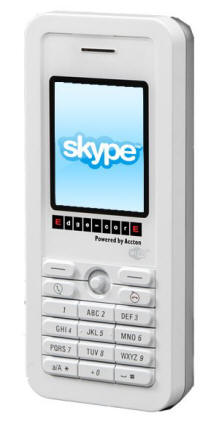
Review: Edge-Core Skype Phone


I wanted something separate from one of my machines while still giving me access to my Skype calls. Doing some searching online I found a handful - but reading the statistics, I settled on the Edge-Core Skype Phone.

Wherever there is an available wireless connection, including WPA/WPA2 encryption, this wireless device gives me access to all things that I need with Skype. This includes the following services:
With a wide screen, easy to access buttons (perfect for my large fingers), light in weight and small in size - this device is perfect for throwing in my bag to go where I want to go. I can manage my account, my contacts and even do my frequent conference calls.

At home I leave this phone on, using my personal wireless network, so that I can phone out or access calls. As a road warrior, sitting at a tea shop, I just search for a strong open network to attach too and then I am available for calls again. All this without turning on one of my machines.

If there are any negatives with this product is that the receiver is poor and it can be hard to hear in a loud environment. When this is a problem I just plug in a headset and I'm good to go.

This is the only Skype phone I've tried but I think I picked a winner my first time out!